Cosmic Kids Learning
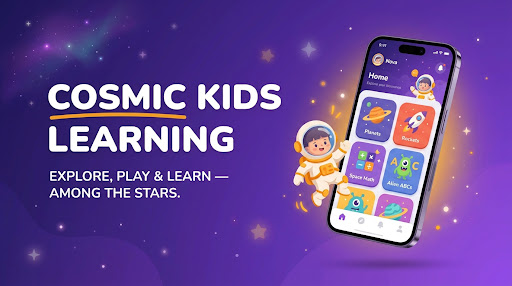
A space-themed, fully-offline learning app that helps kids aged 6–12 explore the alphabet, numbers, colors, shapes and the natural world — guided by Nova, a friendly astronaut mascot — while a PIN-protected Parent Zone keeps screen time in check.
App Showcase
App Screens
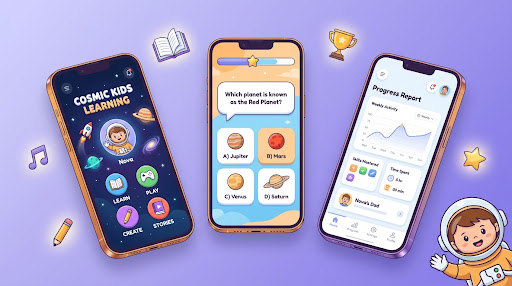
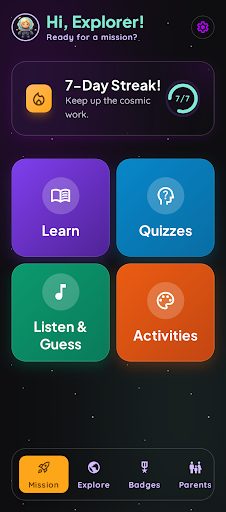
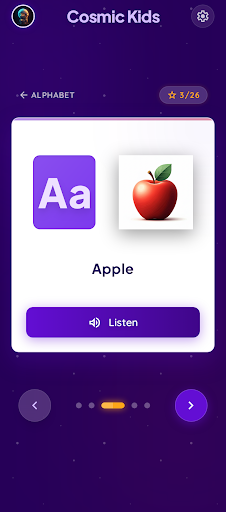
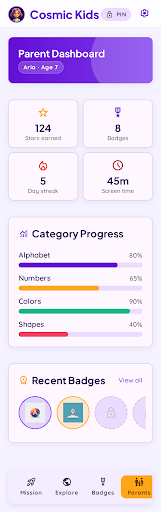
| Kids' Cosmic Home | Alphabet Flashcard | Parent Dashboard |
|---|---|---|
 |  |  |
Overview
Cosmic Kids Learning is a cross-platform educational app built with Flutter for Android, iOS and Windows. It turns early learning into a "Cosmic Discovery" adventure: every lesson, quiz and game is wrapped in a playful space theme designed to keep young learners engaged without overwhelming them.
The app is local-first. All learning content, progress, badges and streaks are stored on-device in SQLite, so it works with zero internet connection — only authentication (Firebase + Google Sign-In) touches the network. This makes it dependable for families on the move or in low-connectivity areas.
I built the project end-to-end as the sole developer — handling product design, the full Flutter codebase, the data layer, the gamification system, and a comprehensive UI/UX overhaul in mid-2026 that introduced the modern gradient design language and the "Cosmic" learning aesthetic.
Problem Statement
Young children lose interest quickly in static, drill-style learning apps, and parents are increasingly wary of unsupervised, always-online screen time. Most kids' apps solve one of these problems but not both — they're either engaging but unsafe/online-dependent, or safe but boring.
Cosmic Kids Learning targets kids aged 6–12 and their parents, pairing genuinely fun, gamified lessons with built-in parental controls and full offline operation, so learning stays engaging and under a parent's control.
Key Features
| Feature | Description |
|---|---|
| Learn Mode | Flashcard-style lessons across 10 categories — alphabet, numbers, colors, shapes, animals, birds, flowers, fruits, months and vegetables — with text-to-speech pronunciation. |
| Quizzes | 9 themed quiz packs that score and track every answer, with results persisted per child. |
| Tracing | Guided letter and number tracing activities to build early writing and fine-motor skills. |
| Listen & Guess | Audio-driven song and sound games using flutter_tts and background music. |
| Look & Choose | Color, shape and letter matching mini-games for recognition and recall. |
| Rewards & Gamification | Stars, badges, multi-day streaks and unlockable modules to keep kids motivated. |
| Parent Zone | PIN-protected dashboard with per-child progress, activity history and screen-time limits. |
Tech Stack
| Layer | Technology |
|---|---|
| Framework | Flutter (Dart, SDK 3.x) |
| State Management | Provider |
| Local Database | SQLite via sqflite / sqflite_common_ffi |
| Auth | Firebase Auth + Google Sign-In |
| Audio / Speech | flutter_tts (text-to-speech), audioplayers (background music) |
| UI / Responsiveness | responsive_framework, custom gradient theme, motion_toast |
| Persistence | shared_preferences (session), local SQLite repositories |
| Platforms | Android · iOS · Windows |
Architecture
The app follows a feature-first structure with a shared core layer (theme, database, services, reusable widgets) and isolated features (auth, learning, parent). Data access is centralized behind repository classes over a single SQLite database, and cross-cutting concerns (session, screen time, audio) are exposed as services through Provider.
App Entry (Splash → Mode Selection)
        ↓
   ┌────┴─────────────┐
Children Mode      Parent Mode
   ↓                   ↓
Login → Child       PIN Gate → Parent Zone
Selection → Shell      ↓
   ↓                Dashboard · Progress · Activity History
Learn · Quiz · Listen · Tracing · Rewards
   ↓
Provider services (AppState · ScreenTime · Audio)
   ↓
Repositories  →  SQLite (on-device)   |   Firebase Auth (network)
A notable design decision was making the data layer fully offline-capable: every learning interaction is written to local SQLite repositories (sessions, progress, badges, streaks, quiz scores), so the app never depends on connectivity to function.
Challenges & Solutions
Challenge 1: Keeping young learners engaged
Problem: Static flashcards and quizzes don't hold a 6–12 year-old's attention for long. Solution: Built a layered gamification system — stars, a badge catalog (first quiz, perfect score, 5-quiz, 3- and 7-day streaks, all-categories explored), daily streaks and unlockable modules — wrapped in a cohesive "Cosmic Discovery" theme with a mascot, animations and background music. Outcome: Learning sessions feel like play, giving kids clear, visible goals to chase across every category.
Challenge 2: Balancing fun with parental trust
Problem: Parents need oversight and protection against unlimited screen time, but kids need an unobstructed experience.
Solution: Added a PIN-protected Parent Zone with per-child progress, activity history, and a ScreenTimeService that enforces daily limits and surfaces a dedicated "Time's Up" screen when the limit is reached.
Outcome: Parents get genuine control and visibility while the child-facing experience stays clean and distraction-free.
Results & Impact
- ✅ 10 learning categories and 9 quiz packs delivered across a single offline-first codebase.
- ✅ Ships to 3 platforms (Android, iOS, Windows) from one Flutter project.
- ✅ 100% offline core experience — all progress, badges and streaks stored on-device.
- ✅ Complete UI/UX overhaul (2026) introducing a modern gradient design system and floating navigation.
What I Learned
Building Cosmic Kids Learning solo sharpened my Flutter architecture skills — especially structuring a feature-first app with a clean repository layer over SQLite, and coordinating cross-cutting services (session, screen time, audio) cleanly through Provider. Designing for children also taught me a lot about restraint: clear visual hierarchy, large touch targets, audio-first feedback and friction-free flows matter far more than feature count.
Just as importantly, designing the Parent Zone reframed the product as a tool parents trust, not just one kids enjoy — a reminder that for family software, the buyer and the user are two different people with two different sets of needs.
Future Improvements
- Multi-language / localization support for non-English learners.
- AI-powered speech-pronunciation feedback (let kids speak and get scored).
- Expanded multi-child family profiles with richer per-child analytics.
Built by VerixSoft · 2026